
맥북 내장 모니터에서는 잘 읽히는 같은 창 사이즈여도 5k나 6k 가 아니면 해상도가 딸려서 가독성이 떨어지는 경우가 있더군요.
프리텐다드나 노토 설치한 후에 (개인적으로는 프리텐다드가 좀 더 좋았습니다. 취향따라 선택하세요)
brew install --cask font-pretendard
brew install --cask font-noto-sans-cjk-kr
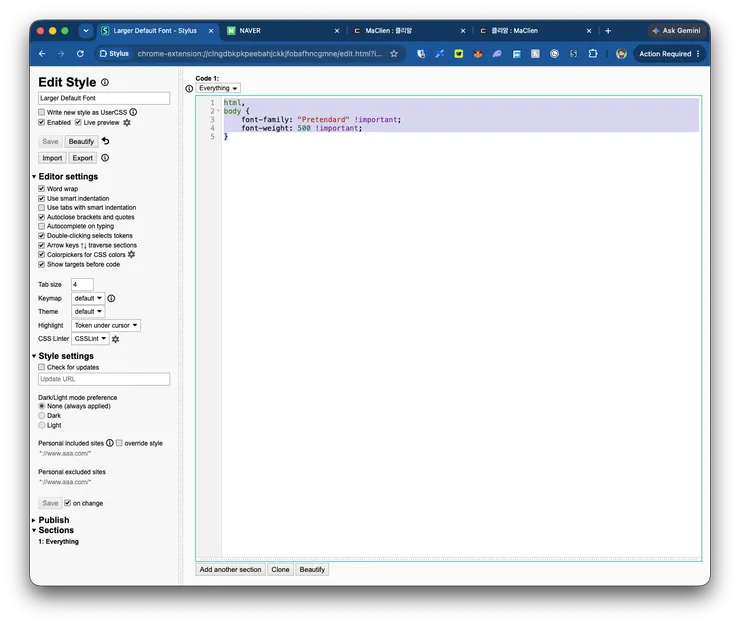
아래 플러그인 설치하니까 가독성이 개선되네요.
https://chromewebstore.google.com/detail/stylus/clngdbkpkpeebahjckkjfobafhncgmne
=============
html,
body {
font-family: "Pretendard"*;
font-weight: 500*;
}
=============
노토로 변환해서 비교해 보세요. 숫자 500 -> 550 으로 바꾸면 더 두꺼워집니다.
html,
body {
font-family: "Noto Sans CJK KR"*;
font-weight: 550*;
}
==============
https://apps.apple.com/us/app/userscripts/id1463298887
/* ==UserStyle==
@name Larger Font
@match *://*/*
==/UserStyle== */
html,
body {
font-family: "Pretendard", "Apple SD Gothic Neo", sans-serif*;
font-weight: 500*;
역시나 *로 표시된 부분은 (느낌표)important; 로 변경하셔야 합니다.