
요즘 비개발자분들도 바이브 코딩 많이 하시던데, 저도 요즘 이것저것 개인적으로 필요한 툴 만들어보고 있습니다.
얼마 전에 이곳 게시판에 BTT 셋팅 공유 요청하신 분이 있었는데, 저도 오랜만에 셋팅 보니까,
언제 설정했는지도 기억 안 나는 단축키가 너무 많아서, 관리도 안 되고 (중복 / 오류) 기억도 못 하고 있었더라구요.
그래서, 설정한 단축키 관리하는 앱 하나 하나 만들어봤습니다.
https://github.com/fpenguin/shortcut-dashboard
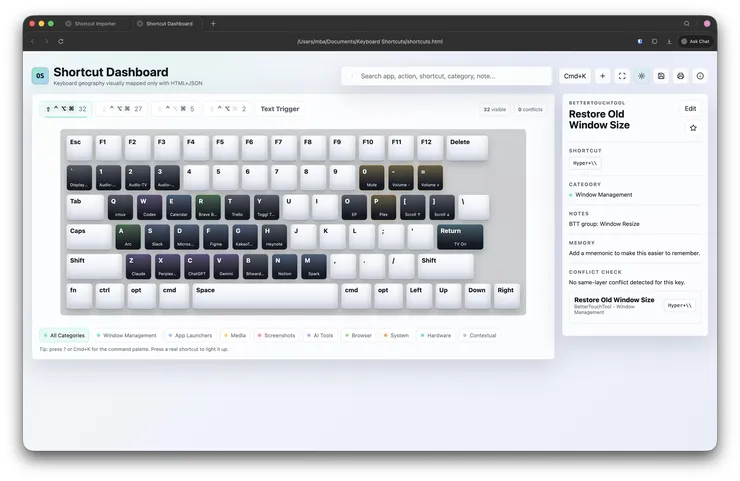
BetterTouchTool 용으로 이미 설정된 단축키를 자동으로 가져오는 기능도 넣었습니다. (BTT 실행 > 우측상단 Preset 클릭 > Export 저장. Shortcut Dashboard 에서 우측 상단 저장 아이콘 클릭 > Import > Download 로 사본 저장)
작업하면서 만족스러웠던 것은, BTT 설정 값을 분석해서 서로 충돌 나는 것이 없는지 확인할 수 있는 import 기능으로 개인적으로 덕을 좀 봤고 (사실 기획에도 없었고 기대도 안 했는데 AI가 알아서 만들어 줬습니다), 복잡한 설치없이 html 하나로도 원하는 결과물이 나와서 너무 좋네요. 쓰면 유용한데 만들어놓기만 하고 안 쓰던 단축키도 디버깅하면서 다시 익숙해졌고, 단축키들도 한번 싹 정리하니까 기분이 후련합니다. :-)
같은 프롬프트로 Claude 랑 Codex 둘 다 시켜봤는데, 제 기준으로 봤을 때 Codex 가 첫 시안을 잘 뽑아줘서,주로 Codex 로 작업했지만 간혹 Claude 한테 프로젝트 폴더 알려주면서 버그 있는지 찾아봐 하면 또 잘 찾더군요. 결국 서로 일시키는 게 능률을 높히는 방법이 아닌가 싶습니다.
최초 프롬프트는 이렇게 작성했었어요.
Create a single-file offline HTML app called “Shortcut OS Dashboard”.
Goal:
I have too many custom keyboard shortcuts spread across:
* BetterTouchTool
* macOS
* Raycast
* Keyboard Maestro
* custom scripts
* app-specific shortcuts
I want a visually memorable dashboard that acts as a personal command center and cheat sheet.
The app must be:
* a SINGLE self-contained HTML file
* no build step
* no backend
* no external dependencies
* no React/Vue/npm
* works by double-clicking the HTML file locally
* all CSS and JS inline
* mobile-friendly
* dark mode by default
* visually polished
* fast and lightweight
The HTML file will sit inside Dropbox and open locally in browser.
==================================================
CORE UX GOAL
This should NOT feel like:
* a spreadsheet
* a boring table
* a documentation page
It should feel like:
* a keyboard operating system
* a visual control center
* a command dashboard
The user should be able to:
* instantly remember shortcuts visually
* search quickly
* understand keyboard geography
* identify conflicts
* discover forgotten shortcuts
==================================================
MAIN FEATURES
1. VISUAL KEYBOARD MAP
* Render a full keyboard visually
* Keys should look like real keyboard keys
* Highlight keys that have shortcuts assigned
* Different colors by category
* Clicking a key opens shortcut details
* Hovering shows tooltip
* Keyboard should scale responsively
2. MODIFIER LAYERS
Support switching between:
* Fn
* Hyper (Cmd+Ctrl+Opt)
* Hyper+Shift
* Cmd
* Ctrl
* Option
Switching layers updates displayed mappings.
3. SEARCH
Add instant search bar:
* search by app
* search by action
* search by shortcut
* search by category
Results should highlight matching keys.
4. CATEGORIES
Use color-coded categories:
* Window Management
* App Launchers
* Media
* Screenshots
* AI Tools
* Browser
* System
* Hardware
* Contextual
5. SHORTCUT DETAIL PANEL
When clicking a key:
Show:
* shortcut
* action
* app/source
* category
* notes
* mnemonic/reasoning
* conflict warnings
6. CONFLICT DETECTION
If multiple actions use same shortcut:
* visually indicate conflict
* red outline or badge
* show all mappings
7. COMMAND PALETTE
Press:
?
or Cmd+K
Open command palette:
* fuzzy search shortcuts
* jump to shortcut
* filter categories
Inspired by:
* Raycast
* VSCode
* Spotlight
8. IMPORT / EXPORT
Store all shortcut data inside:
const shortcuts = […]
Allow:
* JSON export
* JSON import
* localStorage auto-save
9. LIVE KEY DETECTION
When user presses keyboard shortcut:
* highlight matching shortcut
* show action
* animate the key
10. RESPONSIVE LAYOUT
Desktop:
* keyboard center
* side detail panel
* top controls
Mobile:
* stacked layout
* scrollable keyboard
==================================================
VISUAL STYLE
Style should feel like:
* Raycast
* Linear
* Arc Browser
* modern macOS utility
* developer dashboard
Use:
* glassmorphism lightly
* subtle gradients
* rounded keyboard keys
* soft shadows
* smooth transitions
* animated hover states
* clean typography
Dark mode default:
Background:
#0f1115 or similar
Avoid:
* skeuomorphic clutter
* neon gamer UI
* ugly bootstrap tables
==================================================
KEYBOARD GEOGRAPHY CONCEPT
The design should reinforce spatial memory.
Examples:
* HJKL = window movement
* numbers = HDMI/media
* left keyboard = communication apps
* right keyboard = utilities
Add optional “memory notes” to each shortcut.
==================================================
INITIAL SAMPLE DATA
Include realistic sample data based on these mappings:
WINDOW MANAGEMENT:
* Hyper+Left = Left Half
* Hyper+Right = Right Half
* Hyper+Up = Maximize
* Hyper+Down = Restore
* Hyper+H = Left 1/6
* Hyper+J = Bottom Left 1/6
* Hyper+K = Top Left 1/6
* Hyper+L = Right 1/6
APP LAUNCHERS:
* Fn+A = Arc
* Fn+B = Bitwarden
* Fn+F = Figma
* Fn+G = KakaoTalk
* Fn+H = Heynote
* Fn+M = Spark
* Fn+N = Notion
* Fn+R = Brave
* Fn+S = Slack
* Fn+Z = Claude
* Hyper+A = Arc
* Hyper+B = Bitwarden
MEDIA:
* Hyper+1 = HDMI1
* Hyper+2 = HDMI2
* Hyper+3 = HDMI3
* Hyper+4 = HDMI4
* Hyper+P = Play/Pause
* Hyper+M = Mute
SCREENSHOTS:
* Shift+Cmd+3 = Full Screenshot
* Shift+Cmd+4 = Area Screenshot
* Shift+Cmd+5 = Scrolling Screenshot
SYSTEM:
* Hyper+, = Settings
* Hyper+. = BetterTouchTool
* Hyper+Backspace = Empty Trash
==================================================
TECHNICAL REQUIREMENTS
* Single HTML file only
* Inline CSS and JS
* No external assets
* No CDN
* No frameworks
* Pure HTML/CSS/JS
* Modern semantic structure
* Clean code
* Well-commented
* Easy to extend manually later
==================================================
ADVANCED NICE-TO-HAVES
If feasible:
* mini usage analytics
* recently used shortcuts
* favorite/starred shortcuts
* printable cheat sheet mode
* theme switcher
* category toggles
* animated keyboard heatmap
* compact mode
* Vim-style navigation
==================================================
DELIVERABLE
Output:
* one complete self-contained HTML file
* immediately usable
* polished enough to use daily
* not a prototype
* not pseudocode
The result should feel like a real premium utility.
fn + control 등 + key 의 경우 fn 이 상단 레이아웃 메뉴에 표시되지 않음
[기능요청]
단축키도 키보드 자체에도 표시되게 (레이아웃 모드에만 표시)
html 파일 하나만 V1.2.2 확인하시고 엎어씌우시면 됩니다.
기능요청은 제가 잘 이해를 못해서 반영을 못했습니다. 좀 더 구체적으로 설명해 주시면 한번 노력해 보겠습니다.
참고로, Cmd, Ctrl, Opt 누르면 입력 키 인식해서 해당 그룹으로 자동으로 보내주는 기능이 추가되었는데, 아쉽게도 Fn 키는 인식을 못 시키네요. Safari 에서도 안 되는 것으로 봐서는 브라우져 문제는 아닌가 봅니다.
스크린샷 기준으로 첫번째 탭이 하이퍼키 입니다.
그러면 하이퍼키에 대응하는 crtl / opt / cmd / shift 키도 키도드 레이아웃에서 색상으로 표시되면 좋을 듯 합니다.
반영시킨 기능이 맞는지 확인해 주실래요?
modifier 키를 누를 때마다 관련 단축키 뜨는게 굉장히 재밌네요..
이것도 버그인지 모르겠지만 fn키는 이벤트가 먹지가 않네요 ^^;
Karabiner 등으로 Fn 키를 F18 등으로 맵핑시킨 후에, F18+단축키로 설정하는 방법이 있긴 합니다만, 대부분 귀찮아서 안 하시겠죠....
방금 자잘한 버그 잡은 v1.5 올렸으니 한번 확인해 주세요. :-)